
Transparent
Sticky Notes
Online — Free!
Place floating, colorful sticky notes on any webpage. Set reminders, sync across devices, and never lose a thought again — all without creating an account.

Everything You Need in
Sticky Notes Online
More powerful than any basic online sticky notes app — built for real productivity with zero friction.
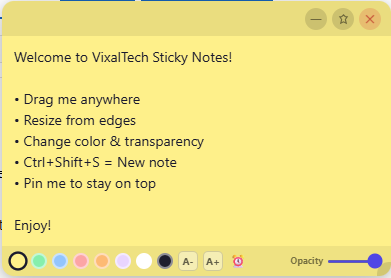
8 Colors + Transparency
Choose from Yellow, Green, Blue, Red, Orange, Purple, White & Dark. Adjust opacity from 20% to 100% with a smooth slider — truly transparent sticky notes online.
Drag & Resize Anywhere
Grab any note from the topbar and drag it to any position. Resize from right edge, bottom edge, or corner — just like a real sticky note on your screen.
Pin / Lock Notes
Pin important notes so they don't move accidentally. A purple border marks pinned notes — perfect for keeping critical reminders always visible.
Unlimited Notes
Open as many sticky notes as you want simultaneously. No limits. No premium tier. All notes visible and usable at the same time.
Reminders & Alarms
Click the ⏰ button on any note, set a date and time — and get an OS-level notification. Never miss a deadline again.
Chrome Sync
Your notes automatically sync across all devices signed into the same Chrome account. Collaborative sticky notes online made effortless — no extra setup.
Keyboard Shortcuts
Ctrl+Shift+S to create a new note instantly. Ctrl+Shift+H to hide or show all notes. Work faster without ever touching your mouse.
Font Size Control
A+ and A- buttons let you increase or decrease text size per note. Great for important notes you want to see from a distance or notes with lots of content.
Popup Notes Panel
Click the extension icon to see all your notes in a list. Delete individual notes or clear all with one click from the popup panel.
See It In Action
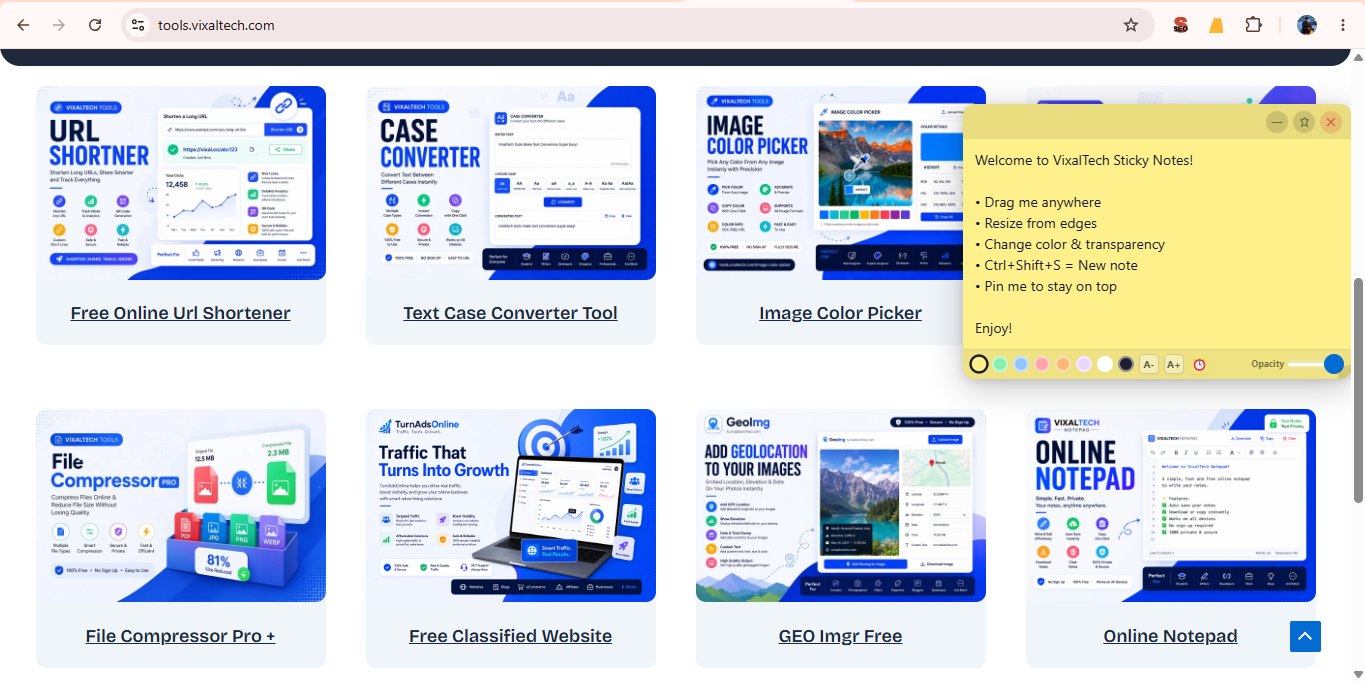
Clean, lightweight notes that float over any page without getting in your way.

%3C/text%3E%3Crect x='60' y='76' width='400' height='1' fill='%23eee'/%3E%3Ccircle cx='76' cy='106' r='10' fill='%23FFE45E'/%3E%3Ctext x='96' y='110' font-family='sans-serif' font-size='12' fill='%23333'%3EWelcome to VixalTech Sticky Notes!%3C/text%3E%3Ctext x='400' y='110' font-family='sans-serif' font-size='18' fill='%23ccc'%3E🗑%3C/text%3E%3Crect x='60' y='122' width='400' height='1' fill='%23f5f5f5'/%3E%3Ccircle cx='76' cy='146' r='10' fill='%23D4F5E4'/%3E%3Ctext x='96' y='150' font-family='sans-serif' font-size='12' fill='%23333'%3EToday's Tasks — 3 pending%3C/text%3E%3Ctext x='400' y='150' font-family='sans-serif' font-size='18' fill='%23ccc'%3E🗑%3C/text%3E%3Crect x='60' y='162' width='400' height='1' fill='%23f5f5f5'/%3E%3Ccircle cx='76' cy='186' r='10' fill='%23FFD8C5'/%3E%3Ctext x='96' y='190' font-family='sans-serif' font-size='12' fill='%23333'%3E⏰ Call client at 4:00 PM%3C/text%3E%3Ctext x='400' y='190' font-family='sans-serif' font-size='18' fill='%23ccc'%3E🗑%3C/text%3E%3Crect x='60' y='202' width='400' height='1' fill='%23eee'/%3E%3Ctext x='60' y='222' font-family='sans-serif' font-size='11' fill='%23FF5C00'%3EClear All Notes%3C/text%3E%3C/svg%3E)
Up & Running in 60 Seconds
No account creation. No complicated setup. Just install and start noting.
Click "Download Now"
Fill in a quick form — we'll email you the Chrome Web Store link or direct ZIP. Takes under 30 seconds.
Install the Extension
Open Chrome, go to Extensions, enable Developer Mode, and drag the file in. Or install directly from Chrome Web Store.
Press Ctrl+Shift+S
A yellow sticky note appears on your screen instantly. Drag it anywhere, type your note, pick a color — you're done.
Notes Auto-Sync Everywhere
Open Chrome on another device logged into the same account — all your notes are already there. Zero effort.
Perfect For Every Type of User
Whether you're a student, developer, or professional — sticky notes online make your browsing smarter.
Students
Annotate research pages, track deadlines, and pin revision notes while studying online.
Developers
Keep API keys, TODO lists, and bug notes floating beside your documentation.
Project Managers
Track tasks, deadlines, and team notes across any project management tool you use online.
Writers & Bloggers
Capture ideas while browsing, note down references, and keep outlines visible beside your drafts.
Shoppers
Compare prices, jot down coupon codes, and track your wish list while browsing e-commerce sites.
Remote Workers
Set meeting reminders, keep quick-access notes beside your tools, and share notes via Chrome Sync.
What Users Are Saying
"Best sticky notes extension I have tried. The transparent mode is absolutely stunning — it sits on top of my page without hiding anything important. I use it every single day."
"Sync across devices is the killer feature for me. I add notes on my work laptop and they appear on my personal PC instantly. This is what collaborative sticky notes online should look like."
"The reminder alarm is brilliant — I was always forgetting meetings. Now I just set a note and let it remind me. Free, no sign-up, works perfectly. Would recommend to everyone."
"I searched for sticky notes online no sign up for weeks. Everything else either wanted an account or charged money. VixalTech Sticky Notes is just perfect — install and go!"
"As a student, I love pinning notes next to my online textbooks. The different colors help me organize by subject. Font size controls are super helpful too."
"Finally something made by an Indian developer that actually works better than the foreign alternatives. Proud to support VixalTech. Keep up the amazing work!"
Frequently Asked Questions
Everything you want to know about free transparent sticky notes online.
Yes — 100% free forever. No hidden charges, no premium plan, no subscription. All 12 features are available to every user at no cost.
No sign-up required at all. Install the extension and start using it instantly — no email, no password, no registration.
Yes! VixalTech Sticky Notes works on every website you visit in Chrome — YouTube, Gmail, Google Docs, news sites, e-commerce platforms, anywhere.
Yes. All notes sync automatically via Chrome Sync. Sign into Chrome on any device and your notes appear immediately — no manual backup needed.
Click the ⏰ icon on any note, pick a date and time, and confirm. When the time arrives, you'll receive an OS-level notification even if Chrome is minimized.
Ctrl+Shift+S creates a new sticky note instantly. Ctrl+Shift+H hides or shows all notes at once. More shortcuts may be added in future updates.
Unlimited. You can create and keep open as many sticky notes as you need — all at the same time, with no restrictions.
Yes. Notes are stored locally in Chrome storage and optionally synced via your own Chrome account. We do not collect or store any of your note content on our servers.
Ready to Supercharge
Your Browsing?
Join 127+ users who use VixalTech Sticky Notes every day — completely free, no strings attached.